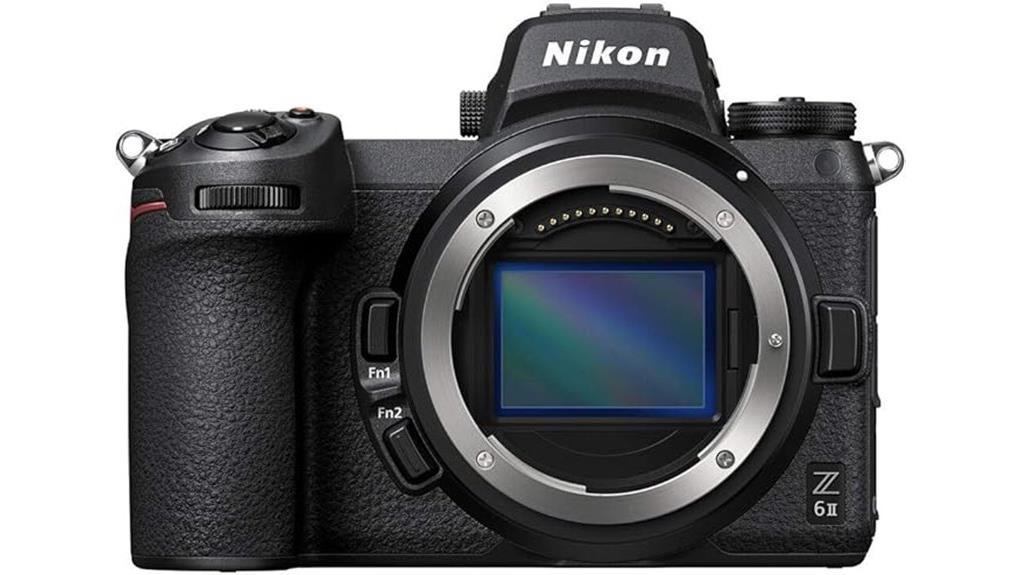
You’ll find the Z 6II gives you full-frame hybrid power with a 24.5MP BSI sensor that delivers clean low-light stills and detailed 4K60 video via full-pixel readout. Autofocus is quicker with stronger tracking for action and dim scenes, and 14 fps bursts plus a much larger buffer cut missed sequences. Ergonomics, dual card slots, and USB-C power suit long shoots. Keep going and you’ll get specifics on lenses, workflows, and alternatives to ponder.
Some Key Takeaways
- 24.5MP full-frame BSI CMOS sensor delivers clean, detailed stills and low-noise 4K video with wide dynamic range.
- Improved autofocus and tracking provide faster subject acquisition and reliable performance for action and dimly lit scenes.
- 14 fps continuous shooting with a much larger buffer reduces missed sequences for sports and wildlife work.
- Full-pixel readout supports clean 4K up to 60p, restrained rolling shutter, and good grading latitude for hybrid shooters.
- Dual card slots, USB-C power, and compact Z lenses enable practical, reliable workflow for extended hybrid shoots.
How the Z 6II’s Sensor and Autofocus Perform in Real-World Shooting
Because the Z 6II pairs a 24.5MP full-frame BSI CMOS sensor with full-pixel readout, you’ll see clean, detailed images and excellent low-light performance that hold up across ISO ranges. You’ll notice wide dynamic range in highlights and shadows, letting you recover detail without pushing noise. Autofocus improvements sharpen subject acquisition and tracking performance, so moving subjects stay locked even in dim scenes. Color accuracy is strong straight from camera, rendering skin tones and foliage naturally with minimal tweaking. In practice, you’ll get reliable stills and video foundations—sensor fidelity and AF make the Z 6II a versatile hybrid tool. This makes it a great choice for mirrorless camera enthusiasts looking to build an essential gear kit with mirrorless accessories to support both stills and video.
Speed and Handling: Continuous Shooting, Buffer, and Ergonomics
Push the Z 6II into an action-packed shoot and you’ll notice how its 14 fps burst rate and substantially expanded buffer keep you on target longer—capture more decisive moments without the frequent slowdowns that hampered the original Z 6. You’ll appreciate faster AF acquisition and sustained frame delivery when tracking subjects, reducing missed sequences. The body balances well with heavier lenses; grip comfort remains excellent for extended handheld work and vertical framing. Mechanical and electronic shutter feel is reassuringly consistent, offering predictable timing and low vibration. Overall, responsiveness and ergonomics combine to make the Z 6II a reliable hybrid shooter. For photographers seeking stability when using longer lenses, pairing the camera with a sturdy tripod from Perfect Tripods can greatly improve image sharpness and handling, especially in low light stability with tripods.
Video Capabilities for Creators: 4K60, Full-Pixel Readout, and Power Options
Having proven itself for fast-paced stills, the Z 6II also handles demanding video work with equal poise: its full-pixel readout enables clean, detailed 4K footage up to 60p, and dual-core processing keeps readout rolling without excessive crop or heavy aliasing. You’ll appreciate the 24.5MP sensor’s noise control for low-light scenes and the camera’s restrained rolling shutter. Use external monitoring to confirm exposure and focus during complex moves; the USB-C constant power option makes longer takes reliable. Files respond well to color grading, giving you latitude in post. This setup suits solo creators and small pro shoots. Consider pairing the camera with external camera monitors to better confirm exposure, focus, and framing during shoots.
Lenses, Storage, and Battery Workflows for Hybrid Shooters
For hybrid shooters who switch between run-and-gun photo assignments and long-form video, lens choices, media handling, and battery management determine how smoothly a day goes. You’ll favor compact Z glass for run-and-gun and stabilized zooms for handheld video; use the FTZ adapter only when a specific F-mount optic is indispensable. Maintain lens maintenance routines—clean elements, check mounts, and service stabilizers—to avoid failures on set. Use the dual slots strategically: CFexpress for primary high-bitrate video, UHS-II SD for backups and proxies. Carry spare EN-EL15c batteries and a charger or USB-C power bank. Establish clear backup workflows for media and power. For best results when shooting extended sessions, consider high-capacity memory cards to minimize swaps and streamline file management.
Who Should Buy the Z 6II (And Which Alternatives to Consider)
Although the Z 6II won’t be the only camera you’ll consider, you’ll want it if you need a versatile full‑frame body that balances strong low‑light stills, reliable 14 fps shooting, and full‑frame 4K60 video without breaking your kit budget. You’ll get excellent autofocus, a bigger buffer, dual cards, and USB-C power—great for travel photographers who need one body for photos and video. If you prioritize ultimate resolution, fast-action pro speed, or lighter weight, consider alternatives: Z 7II for resolution, Z 9 or mirrorless sports bodies for top speed, and APS-C or older full-frame models as budget alternatives. For wildlife and sports shooters who need reach and subject isolation, pairing the Z 6II with a telephoto lens is often the best compromise.
Some Questions Answered
Does the Z 6II Have In-Body Image Stabilization (IBIS)?
Yes — you get in body stabilization. You’ll use sensor shift five axis stabilization to steady stills and video, improving low-light handheld shots and telephoto framing. The system integrates with lens stabilization when available, reducing shake and helping frame smoothing in motion. You’ll notice better continuous shooting and autofocus stability thanks to the buffered readout and faster acquisition, making the Z 6II a reliable hybrid tool.
What Is the Native ISO Range and Low-Light Performance Curve?
The native ISO range is ISO 100–51200 (expandable lower and higher). You’ll find the Low light curve favors clean mid ISOs, with excellent noise control up to about ISO 3200 and usable results to ISO 12800 for web or small prints. Dynamic range gently rolls off as ISO rises, but full-pixel readout and BSI sensor sustain detail and highlight retention, so you can push shadows with confidence in many low-light scenarios.
How Long Can It Record 4K60 Continuously Without Overheating?
You can typically record 4K60 for about 20–30 minutes before the camera risks thermal throttling under ambient room temps; exact time varies with scene brightness and recording bitrates. If you need longer sessions, you’ll want to use USB-C constant power, external recorders, or fan mods to dissipate heat. Fan mods and airflow can extend continuous runtime substantially, but they’ll void warranty and require careful testing for reliability.
Is Headphone and Microphone Input Available for Monitoring Audio?
Yes — you get headphone monitoring and a microphone jack. You’ll plug external microphones into the dedicated 3.5mm mic input for cleaner capture, and you’ll monitor levels and sound via the 3.5mm headphone output. This lets you confirm audio quality during shoots and livestreams. The camera supports real-time monitoring while recording, so you can adjust levels, wind protection, or mic placement to guarantee consistent, professional audio results.
Does It Support In-Camera RAW Video or N-Log Profiles?
Yes — you’ll get N-Log and Raw recording options. You can record N-Log for a flat, graded-friendly image and capture higher dynamic range in-camera. For Raw recording, the Z 6II supports ProRes RAW output over HDMI to an external recorder (not internal Raw to cards). You’ll use external recorders for Raw recording, while internal N-Log gives you flexible color grading without needing external capture.