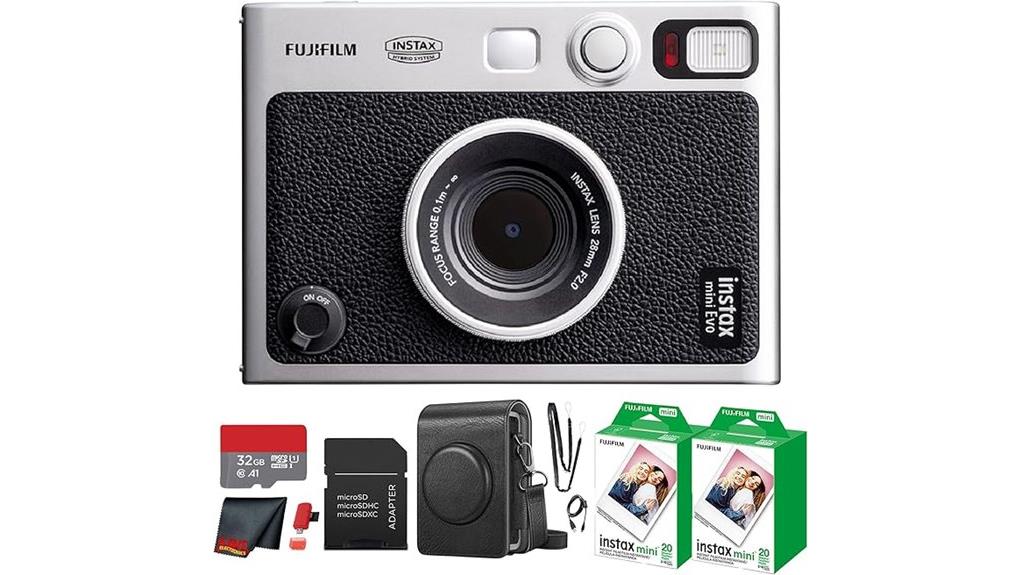
You get a compact, well-built hybrid that captures digital files and prints tactile Instax photos on demand, letting you pre-edit looks before committing to paper. It feels solid in hand with a textured grip, dual shutter buttons, 28mm-equivalent f/2 lens, 3.0″ LCD, and a tactile metal print lever. The app enables crop, exposure, and presets; prints show warm, soft-contrast film character. Battery and fixed lens are limits, and more details explain workflow and image quality.
Some Key Takeaways
- Hybrid camera captures digital files and prints selected images on-demand to Instax Mini film for curated physical keepsakes.
- Compact 28mm-equivalent f/2 lens is fixed, with macro mode and subtle focus ring, limiting framing but offering sharp everyday results.
- Two-stage workflow: shoot digitally, review on 3.0″ LCD, edit (crop/exposure/filters) in-app, then print to control final look.
- Ten lens effects, ten film simulations, double exposures, and texture overlays enable creative, analog-style results before printing.
- Strong build, tactile print lever, microSD storage expansion, but modest battery life and small LCD may hinder heavy shooting sessions.
What the Instax Mini EVO Is and Who It’s For
Think of the Instax Mini EVO as a compact hybrid camera that captures digital images and gives you tactile instant prints on demand. You’ll get precise control over capture and print: digital storage with microSD expansion, selectable prints, and in-app editing for crop, exposure, and tone. Visually, the camera produces framed Instax prints that evoke instant nostalgia while the digital workflow supports backups and sharing. It’s aimed at travelers, journalers, and creators who want both curated digital files and physical keepsakes for social gifting. You’ll appreciate the editable presets and print-on-demand workflow for intentional, paper-based results. It’s a great option for those who want to capture moments anywhere with a portable photo printer.
Hands-On Hardware Tour: Design, Controls, Lens, and Ergonomics
While compact at a glance, the Instax Mini EVO packs a deliberate blend of tactile controls and digital readouts that prioritize quick framing and one-handed operation. You’ll notice a pronounced textured grip on the right flank that stabilizes handhold for portrait or landscape shooting. The dual shutter buttons and concise button layout place exposure, playback, and print commands within thumb reach. A fixed 28mm-equivalent f/2 lens sits flush with a subtle focus ring and macro mode marking. The 3.0″ LCD provides composition feedback; a built-in selfie mirror aids alignment. A metal print lever delivers tactile, analog-style confirmation when you output images. If you plan on shooting outdoors for extended periods, consider pairing the camera with a photography vest to keep film packs and accessories close at hand.
Hybrid Capture & Printing in Practice: Workflow, App, and Image Quality
Getting a shot from capture to print on the Instax Mini EVO is a deliberate, two-stage process that puts you in control of what—and how—you print. You capture digitally, review on the 3.0″ LCD or in-app, then select files for analog output. The app workflow syncs over Bluetooth, lets you crop, rotate and adjust brightness/contrast/saturation, and supports remote shooting and smartphone prints. Internally stored files plus microSD give flexible management. Printing engages physical film chemistry; expect slight color shifts compared with the screen. Measured objectively, print fidelity is consistent with instant-film characteristics—soft contrast, film grain, and warmth. This workflow pairs well with photo-editing tools like Lightroom presets to refine images before you print.
Creative Controls, Modes, and Real-World Shooting Examples
Because the Instax Mini EVO pairs precise digital controls with tactile film output, you can previsualize and tailor images before committing them to chemistry—select among 10 lens effects and 10 film simulations, tweak exposure and white balance, apply filters or soft-focus, then preview the combined result on the 3.0″ LCD or in the app to make certain composition and tonal balance match your intent. You’ll explore creative presets for quick looks, execute timed exposures for low-light scenes, and layer texture overlays for analog grit. Use double exposure to combine frames, motion blur for dynamic subjects, and basic color grading to refine prints before you release them. For consistent studio results, consider using a dedicated product photography box to control lighting and background.
Pros, Cons, and Should You Buy the Instax Mini EVO?
You’ve seen how the EVO’s digital controls let you craft looks before committing to film; now evaluate whether that workflow and the camera’s hardware justify buying one. You’ll appreciate precise color accuracy, adjustable exposure/white balance, and tactile print lever for intentional output. Pros: hybrid capture saves shots, microSD expands storage, strong build, useful creative presets, decent resale value for Fujifilm instant models. Cons: modest battery life under heavy use, fixed 28mm lens limits framing, small LCD imposes a learning curve for menus. Buy if you prioritize analog prints with digital control; skip it if you need fast, uninterrupted shooting. This review is aimed at readers of an online store that focuses on gear for mirrorless camera enthusiasts, so consider how the EVO complements a mirrorless kit.
Some Questions Answered
Does the Camera Support RAW or Uncompressed Image Files?
No — you won’t get RAW support; the camera captures compressed JPEGs for its hybrid workflow. You’ll work with compressed files stored in internal memory or on the included 32GB microSD, and the INSTAX app handles additional compression when transferring or editing. Visually, JPEG output is optimized for instant printing and app-based edits, not for extensive post-process recovery that uncompressed RAW files would enable.
Can You Charge the Camera With Third-Party USB-C Chargers?
Yes — you can use third party charging, as the camera supports USB C compatibility for power input. Use a reputable USB‑C charger that supplies the camera’s required voltage/current (follow Fujifilm’s specs in the manual). Visually inspect connectors for fit and avoid loose cables. Don’t use damaged or ultra‑high wattage PD chargers without verifying compatibility; doing so reduces risk of charging faults and preserves battery life and camera electronics.
Is the Included microSD Card Pre-Formatted and Replaceable?
Yes — the included 32GB microSD card comes pre-formatted and is replaceable. You’ll slide it into the camera’s microSD slot; microSD compatibility supports common FAT32/exFAT formats for easy swapping. Visually inspect contacts and seating to guarantee proper connection. To manage card lifespan, rotate cards, avoid sudden power loss during writes, and back up prints regularly via the app. Replace the card when read/write errors or reduced capacity appear.
Are Replacement Cases and Accessories Officially Available?
Yes — you can buy official cases and also use third party accessories. Fujifilm offers a vintage protective case in the bundle and sells replacement official cases matching the Mini EVO’s form factor; they provide precise cutouts and material specs. Third party accessories (straps, mounts, grips, bags) are widely available with varied textures, colors, and attachment standards. Inspect dimensions, button access, and microSD/film loading clearance before purchasing.
Does the Camera Support Wireless File Transfer to Non-Smartphone Devices?
No — you can’t wirelessly transfer files to non-smartphone devices directly. The camera supports wireless printing from smartphones via the INSTAX MINI EVO app and wired desktop transfer using the included SD card or microSD card reader. For desktop transfer, you remove the card and read it on your computer; there’s no native Wi‑Fi client or Bluetooth file transfer protocol for PCs or tablets, only smartphone app wireless printing functionality.