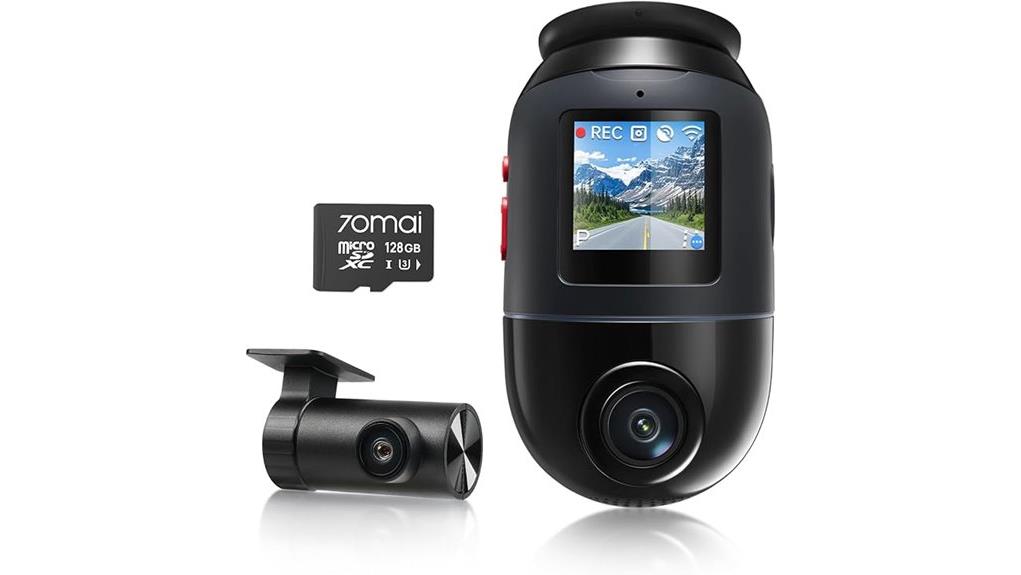
You’ll get professional dual 4K/60 capture with a rotating 146° front module, STARVIS 2 low‑light imaging, Night Owl and Lumi color night modes, plus GPS logging and emergency lock for evidentiary clips. Wi‑Fi 6 and optional 4G enable fast transfers and remote view; AI Motion Detection 2.0 and ADAS reduce false alerts and add safety warnings. Super‑capacitor power and U3/128 GB support suit continuous parking use—keep going to see detailed benchmarks and installation tips.
Some Key Takeaways
- Dual 4K/60 FPS front and rear sensors deliver crisp license-plate and lane detail across a 146° front field and near-360° coverage.
- STARVIS 2, Night Owl, and Lumi Vision provide strong low-light performance with preserved color and minimal noise or artifacts.
- Wi‑Fi 6 and optional 4G LTE enable fast 4K transfers and remote live view, though LTE may need SIM/APN troubleshooting.
- Smart features include AI Motion Detection 2.0, rotating front module, ADAS warnings, parking time‑lapse, and emergency video lock.
- Recommended: professional hard‑wiring, U3/128 GB microSD, enable time‑lapse, and use super‑capacitor for thermal and power reliability.
What the 70mai 4K Omni X800 Promises: Key Specs at a Glance
While marketed as an all‑in‑one security and recording system, the 70mai 4K Omni X800 delivers measurable specs you can verify: dual 4K (3840×2160) front and rear sensors at 60 FPS with Maicolor Vivid+ and ROI license‑plate enhancement, a 146° wide‑angle front lens with 340° rotation for near‑360° coverage, STARVIS 2 low‑light imaging plus Night Owl Vision and Lumi Vision for full‑color nighttime capture, Wi‑Fi 6 (5 GHz) for fast 4K transfers, optional 4G LTE remote access, GPS logging, AI Motion Detection 2.0 with false‑alarm filtering, Smart ADAS warnings, emergency video lock (180 s pre‑, 30 s post‑event), time‑lapse parking, U3/128 GB storage support, and a super‑capacitor power module for reliable operation and power‑loss protection.
You’ll evaluate accuracy, color calibration procedures, and build materials for durability and heat tolerance.
Accessories like high‑quality HDMI adapters and cable solutions can help integrate the dash cam with external monitors and recording systems for easier footage review and backup; consider HDMI accessories when planning your setup.
Real‑World Video & Low‑Light Performance: 4K, STARVIS 2, and Night Owl Vision
Having outlined the Omni X800’s specs, let’s examine how its 4K sensors, STARVIS 2, and Night Owl Vision perform on the road and at night. You’ll notice 4K clarity at 60 FPS delivers crisp license‑plate and lane detail across the 146° field; ROI and Maicolor Vivid+ sharpen contrast without oversaturation. In low‑light trials STARVIS 2 increases usable exposure, reducing noise and preserving color. Night Owl balances highlights and suppresses glare from oncoming headlights; combined with Lumi Vision you get near‑full‑color recordings in very dark scenes. Overall, imaging is robust for evidentiary needs, with predictable exposure and minimal artifacting. Flash diffusers can improve close-range illumination for interior cabin recordings by softening harsh light and reducing glare from reflective surfaces flash diffusers.
Connectivity, Remote Access, and App Experience With 4G, Wi‑Fi 6, and GPS
Because the Omni X800 combines 4G LTE, Wi‑Fi 6, and GPS, you get a flexible remote‑access toolkit that supports live view, fast 4K file transfers, and precise location tracking for incident verification. You’ll stream live via LTE (requires optional hard‑wire kit) and fall back to 5 GHz Wi‑Fi 6 for up to ~20 MB/s downloads. GPS embeds accurate coordinates and speed data into clips for evidence. The 70mai app is responsive, but expect occasional LTE troubleshooting steps (SIM, signal, APN). Review app privacy settings: disable unnecessary cloud sync, limit permissions, and enable firmware updates for security. High-speed memory cards are recommended for reliable 4K recording with minimal dropped frames and smoother loop overwrite management using speedy memory.
Smart Features That Matter: AI Motion Detection, ADAS, and Parking Monitoring
Typically, the Omni X800’s smart suite lets you rely on automated monitoring without constant oversight. You get AI motion that tracks moving objects with a rotating front module and filters false triggers, reducing irrelevant clips. ADAS issues real-time forward-collision, lane-departure, and speed warnings with low latency, aiding situational awareness rather than replacing driver judgment. Parking alerts operate 24/7, combining time-lapse capture and event-triggered high-resolution clips to conserve storage while preserving incidents. Emergency video lock secures pre/post-event footage on sudden impact or power loss. Overall, the system emphasizes reliable detection, actionable alerts, and efficient storage management.
Value and Buying Verdict: Installation, Power Reliability, Storage Needs, and Who Should Buy
The Omni X800’s smart detection and ADAS capabilities set the operational baseline, so the buying decision then rests on install complexity, power reliability, and storage strategy. You’ll want professional hard‑wiring for full 4G and parking power; installation tips: route cabling behind trim, secure the rear unit, and program GPS before sealing. Super‑capacitor power delivers robust thermal range and last‑clip preservation; you won’t face battery swelling. Use U3 or higher microSD (128 GB recommended) and enable time‑lapse to minimize overwrites. Consider warranty considerations if you plan DIY installs. Buy if you need high‑resolution evidence and dependable 24/7 monitoring. If you plan to transport camera gear frequently, consider protective Pelican cases to keep your dash cam, cables, and accessories safe during travel.
Some Questions Answered
Does It Support Simultaneous Front and Rear 4K Recording?
Yes — you can record front and rear at 4K simultaneously. You’ll get simultaneous encoding of dual 4K streams with synchronized timestamps; the system offloads processing to hardware to maintain 60 FPS front and matched rear clarity. Expect heavy storage use, so the camera relies on storage management features: U3 or faster microSD (up to 128 GB), time‑lapse parking mode, and emergency locking to preserve critical clips without filling the card.
Can Firmware Updates Be Applied Over 4G or Only via Wi‑Fi?
You can’t apply OTA updates over 4G; firmware updates require Wi‑Fi. OTA updates are delivered via the 70mai app and the dash cam’s Wi‑Fi (5 GHz) for full package downloads. Cellular limitations—bandwidth caps, stability, and carrier restrictions—prevent reliable large-file OTA flashing, so the device blocks remote firmware installs over cellular. Use a stable Wi‑Fi connection to guarantee integrity, rollback safety, and faster verification during update.
Is Hard‑Wire Kit Included With the Dash Cam?
No — the hard‑wire? kit isn’t included. You’ll need to buy the hard‑wire accessory separately if you want true parking mode with continuous power. For power supply options, you can use a super capacitor module (recommended) or an external battery pack; evaluate vehicle fuse-box access before purchase. Installation tips: route harness along headliner, use add‑a‑fuse for ignition‑switched and constant circuits, secure ground, and verify parking‑mode triggers after setup.
What Mounting Options Are Compatible With Curved Windshields?
You can use both a suction mount and a magnetic bracket for curved windshields; suction mounts with flexible bases conform better to curvature, while magnetic brackets require a flat adhesive puck as an intermediary. Evaluate surface angle, suction cup diameter, and adhesive puck placement to guarantee secure contact and minimize vibration. For peak stability, choose high‑quality silicone suction cups, reinforced magnetic plates, and verify torque limits before long trips or extreme temperatures.
Does the Unit Void Vehicle Warranty When Installed?
No—installing the unit itself shouldn’t automatically void your vehicle warranty, but warranty transferability and dealership policies matter. You’re responsible for professional, non-invasive installation (adhesive/mounting or hard‑wire kits); damage caused by improper installation can be excluded. Keep receipts, use qualified installers, and document original components to dispute denial. If a dealer claims voidance, request written justification tying the claimed defect to the dash cam before they refuse coverage.